
What is MyFitnessPal? MyFitnessPal is a popular health and fitness app that helps you track your food intake, exercise, and weight. Can I track my progress towards my fitness goals with MyFitnessPal? Yes, MyFitnessPal allows you to set and monitor your progress towards various fitness goals, including weight loss and muscle gain. Who is MyFitnessPal for? MyFitnessPal is for anyone looking to improve their health and fitness, from beginners to experienced individuals.
Embarking on a fitness journey is exciting, but knowing where to start can feel overwhelming. Fortunately, tools like MyFitnessPal are designed to simplify this process and empower you to take control of your health. This comprehensive guide will walk you through how to use MyFitnessPal effectively, from the initial setup to advanced tracking techniques, ensuring you can unlock your full fitness potential.
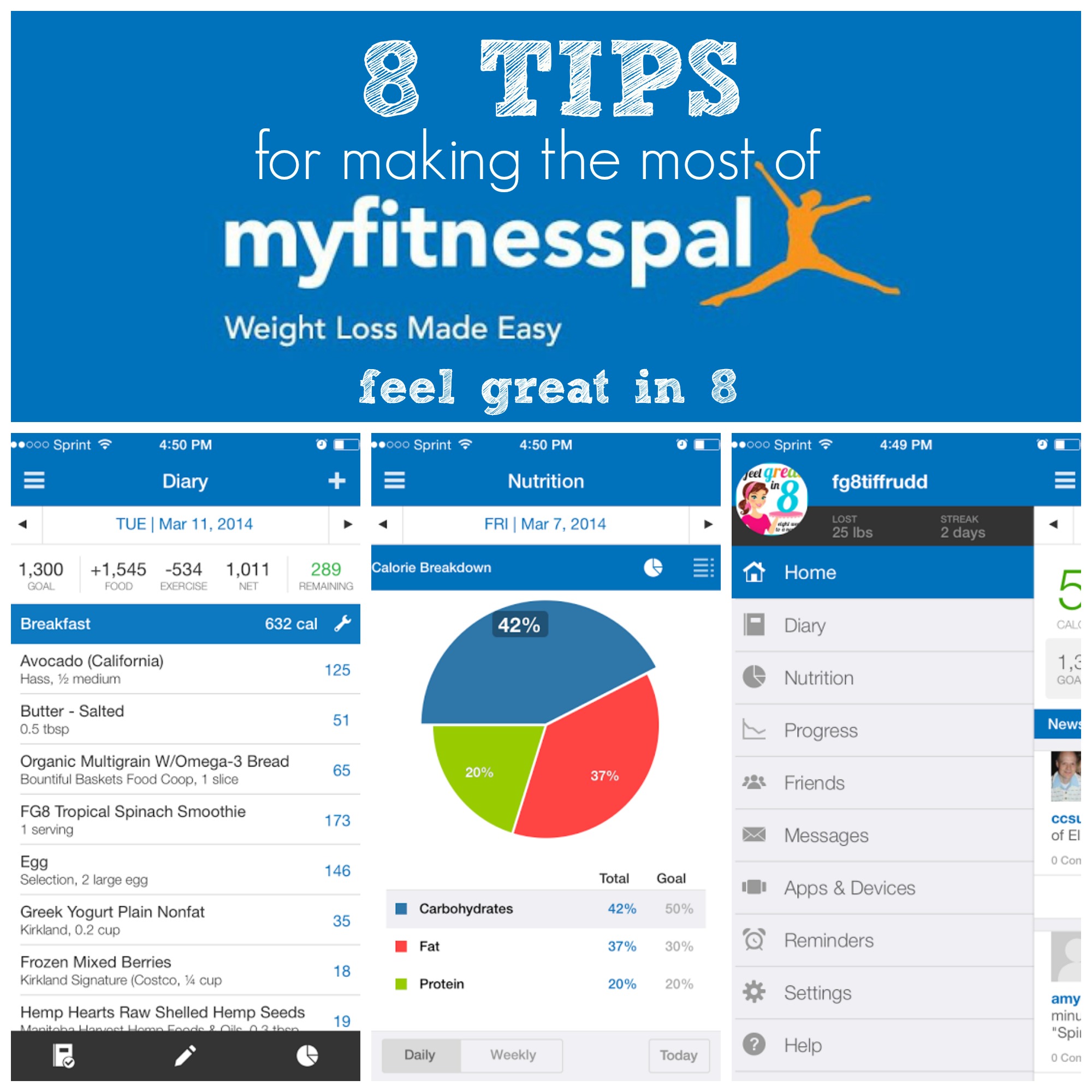
Image Source: blog.feelgreatin8.com
Getting Started with MyFitnessPal
The first step to unlocking your fitness journey is a solid MyFitnessPal setup. This initial phase is crucial as it tailors the app to your specific needs and goals.
Creating Your Account
- Download the App: Find MyFitnessPal on your device’s app store (iOS or Android) and download it.
- Sign Up: You can sign up using your email address, Google account, or Facebook account.
- Basic Information: You’ll be asked for your gender, age, height, and current weight. Be accurate, as this information is vital for calorie and macronutrient calculations.
Setting Your MyFitnessPal Goals
Once your profile is created, you’ll define your primary objective. MyFitnessPal is incredibly versatile for various aims.
- Weight Loss: If your goal is MyFitnessPal weight loss, you’ll specify your target weight and the rate at which you’d like to lose it (e.g., 1 pound per week). The app will then calculate your daily calorie goal to achieve this.
- Weight Gain: For those looking to gain weight, you’ll set a target weight and a desired gain rate.
- Maintenance: If you’re happy with your current weight, you can choose to maintain it.
- Nutritional Goals: Beyond weight, you can also set goals for specific nutrients like protein, carbohydrates, and fats.
MyFitnessPal’s algorithms use your personal data and goals to create a personalized daily calorie and nutrient target. This forms the backbone of your tracking calories MyFitnessPal strategy.
Mastering Food Logging in MyFitnessPal
The core of MyFitnessPal’s utility lies in its ability to help you with logging food MyFitnessPal. Accurate and consistent logging is key to achieving your health objectives.
The MyFitnessPal Diary
The MyFitnessDiary is your daily record of everything you eat and drink. It’s organized into meals (Breakfast, Lunch, Dinner, Snacks) and allows for easy addition of food items.
Adding Foods
MyFitnessPal boasts an extensive database of foods, making tracking calories MyFitnessPal remarkably straightforward.
- Searching the Database:
- Tap the “+” button on your diary screen.
- Select the meal you’re logging for.
- Type the name of the food (e.g., “apple,” “chicken breast,” “oatmeal”).
- MyFitnessPal will present a list of matching foods. Look for verified entries (often indicated by a checkmark) for the most accurate nutritional information.
- Select the correct serving size and quantity.
- Using the MyFitnessPal Barcode Scanner**: This feature is a game-changer for packaged foods.
- Tap the “+” button and select “Add Food.”
- Tap the barcode icon.
- Scan the barcode on the food packaging using your phone’s camera.
- MyFitnessPal will automatically pull up the food’s nutritional information.
- Confirm the serving size and add it to your diary.
- Creating Custom Foods: If a food isn’t in the database, you can create a custom entry.
- Go to “Add Food” and select “Create My Own Food.”
- Enter the food name, serving size, and crucial nutritional details (calories, protein, carbs, fat). You can find this information on the food packaging or online.
- Logging Meals and Recipes:
- Meals: If you eat the same combination of foods regularly, you can save it as a “Meal” for quick logging.
- Recipes: For homemade dishes, MyFitnessPal allows you to create custom recipes.
- Navigate to “More” > “Recipes & Foods” > “Recipes.”
- Select “Create a Recipe.”
- Enter the recipe name, serving size, and then add each ingredient by searching the database or entering them manually.
- MyFitnessPal will calculate the nutritional information per serving. You can then log this recipe directly into your diary. This is excellent for tracking your homemade MyFitnessPal recipes.
Portion Control Tips
- Be Precise: Use measuring cups and spoons for accuracy, especially when starting.
- Weigh Your Food: For the most accurate calorie tracking, weighing your food using a kitchen scale is highly recommended.
- Restaurant Meals: Many chain restaurants have their menus uploaded to MyFitnessPal. Look for them, but be aware that ingredients and preparation methods can vary, so sometimes approximations are necessary.
Understanding MyFitnessPal Nutrition
Beyond just calories, MyFitnessPal provides a detailed breakdown of your macronutrient and micronutrient intake.
Macronutrients: Protein, Carbs, and Fats
Your daily calorie goal is typically distributed among these three essential macronutrients. MyFitnessPal allows you to set targets for each.
- Protein: Crucial for muscle repair and growth, satiety, and metabolic function.
- Carbohydrates: Your body’s primary energy source. Opt for complex carbs like whole grains and vegetables.
- Fats: Essential for hormone production, nutrient absorption, and energy. Focus on healthy fats from sources like avocados, nuts, and olive oil.
MyFitnessPal’s “Nutrition” tab provides a visual representation of your daily intake, showing how close you are to your targets. This is invaluable for making informed food choices and ensuring a balanced diet.
Micronutrients
MyFitnessPal also tracks many vitamins and minerals (micronutrients). While it’s not always necessary to hit every single micronutrient target daily, consistently low intake of certain micronutrients can indicate dietary deficiencies.
Reading Your Nutrition Reports
- Daily Summary: The app shows your total intake for the day and how it compares to your goals.
- Weekly Reports: Over time, you can review your average intake to identify patterns and areas for improvement.
Tracking Exercise with MyFitnessPal
To achieve your fitness goals, it’s essential to consider both your diet and your physical activity. MyFitnessPal makes MyFitnessPal exercise tracking simple and effective.
Adding Exercise
- Cardio:
- Go to your diary and tap “Add Exercise.”
- Select “Cardio.”
- Search for the type of exercise (e.g., “running,” “swimming,” “cycling”).
- Enter the duration and intensity (if applicable). MyFitnessPal will estimate the calories burned.
- Strength Training:
- Select “Strength Training.”
- Search for specific exercises (e.g., “bench press,” “squats”).
- Enter the sets, reps, and weight used. MyFitnessPal will calculate estimated calories burned based on the intensity and duration.
- Connecting Wearables and Apps:
- MyFitnessPal seamlessly integrates with a wide range of fitness trackers and apps (like Fitbit, Garmin, Apple Health, Google Fit).
- Navigate to “More” > “Apps & Devices.”
- Connect your preferred device or app. This allows for automatic syncing of your workouts, providing a more accurate picture of your daily calorie expenditure.
Calorie Adjustments from Exercise
When you log exercise, MyFitnessPal adjusts your daily calorie goal. This means if you burn extra calories through physical activity, you might have a slightly higher calorie allowance for the day, which can be beneficial for MyFitnessPal weight loss efforts or for fueling muscle growth.
Advanced Features and Tips for Success
To truly maximize your MyFitnessPal setup, explore these advanced features and strategies.
Water Tracking
Staying hydrated is fundamental to good health. MyFitnessPal has a dedicated section for logging your water intake. Aim to hit your daily water goal.
Progress Photos
While the scale is a common measure of progress, seeing physical changes can be incredibly motivating. MyFitnessPal allows you to upload progress photos, creating a visual timeline of your transformation.
Weight Tracking and Charts
Regularly logging your weight is crucial. MyFitnessPal plots your weight on a chart, allowing you to visualize your progress over time and identify trends.
Community and Support
MyFitnessPal has a community forum where users share tips, recipes, and support. Engaging with others can provide motivation and accountability.
Premium Features
MyFitnessPal offers a premium subscription with additional benefits:
- Nutrient Tracking: Deeper insights into vitamins, minerals, and fiber.
- Meal Plans: Customized meal plans based on your goals.
- Recipe Importing: Easily import recipes from websites directly into your MyFitnessPal recipes tracker.
- Advanced Reports: More detailed analysis of your eating habits.
Frequently Asked Questions (FAQ)
Q: How accurate is MyFitnessPal’s calorie counting?
A: MyFitnessPal’s accuracy depends heavily on the user’s logging habits. The database is vast, but variations in brands, preparation methods, and serving sizes can affect precision. Using the barcode scanner and weighing food offers the best accuracy.
Q: Can I use MyFitnessPal for muscle gain?
A: Absolutely. While often associated with weight loss, MyFitnessPal is effective for muscle gain by helping you track calorie surpluses and ensuring adequate protein intake. You’ll need to set your goals accordingly.
Q: What if I forget to log a meal?
A: You can go back and add past meals to your diary. MyFitnessPal allows you to adjust the time and date of your entries.
Q: How often should I log my weight?
A: For most people, weighing yourself once a week is sufficient. Some prefer daily weigh-ins, but it’s important to remember that daily fluctuations are normal and not indicative of true progress. Consistency in when and how you weigh yourself is key.
Q: Is it okay to eat out while using MyFitnessPal?
A: Yes, it is. MyFitnessPal has a large database of restaurant foods. If you can’t find an exact match, you can often find similar items or create a custom entry. Doing your best to estimate portion sizes will help.
Conclusion
MyFitnessPal is more than just a calorie counter; it’s a powerful tool that can guide and support you throughout your fitness journey. By dedicating time to your MyFitnessPal setup, consistently logging food MyFitnessPal, utilizing the MyFitnessPal barcode scanner, and paying attention to MyFitnessPal nutrition, you are laying the foundation for success. Whether your aim is MyFitnessPal weight loss, muscle gain, or simply a healthier lifestyle, MyFitnessPal provides the data and insights you need. Embrace the process, stay consistent, and you’ll be well on your way to unlocking your fitness potential.