
Can you build a fitness app? Yes, you absolutely can! Developing a successful fitness app involves a structured approach, from the initial spark of an idea to the final launch. This comprehensive guide will walk you through each crucial step, ensuring you have a clear roadmap for your fitness app development journey.
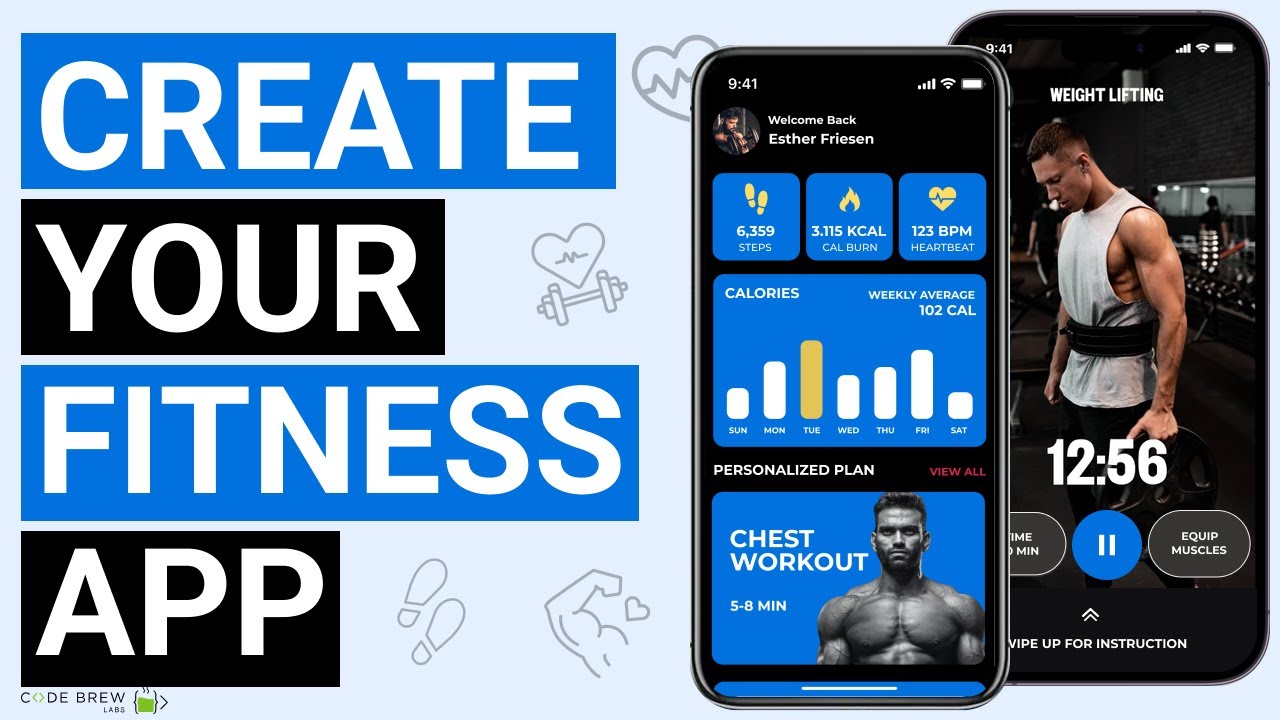
Image Source: i.ytimg.com
Your Fitness App Idea: The Seed of Success
Every great mobile fitness app begins with a solid idea. What problem does your app solve? Who is your target audience? What makes your app unique in the crowded fitness app development market?
Defining Your Niche
The fitness industry is vast. To stand out, you need to identify a specific niche.
- Target Audience: Are you catering to beginners, elite athletes, seniors, pregnant women, or individuals with specific health conditions?
- Type of Fitness: Will your app focus on strength training, yoga, running, mindfulness, nutrition, or a combination?
- Unique Selling Proposition (USP): What features or benefits will make your app different and more appealing than competitors? For instance, personalized AI coaching, gamified challenges, or integration with specific wearables.
Market Research: Knowing Your Landscape
Before you start designing or coding, it’s essential to understand the existing market.
- Competitor Analysis: Identify existing workout app creation platforms. Analyze their features, pricing, strengths, and weaknesses. Look at user reviews to gauge what people like and dislike.
- User Needs: Conduct surveys, interviews, or focus groups with your potential target audience. What are their pain points? What features would they find most valuable?
Planning Your Fitness App: Blueprint for Building
A well-defined plan is the backbone of any successful fitness app development. This phase involves detailing your app’s functionality, user flow, and overall structure.
Feature Prioritization: What to Build First
Not all features are created equal. Prioritize based on core functionality and user needs.
Core Features (Must-Haves)
These are the essential elements that define your app’s purpose.
- User Profiles: Allow users to create accounts, set goals, track progress, and input personal data (age, weight, fitness level).
- Workout Library: A collection of exercises with descriptions, images, or videos.
- Workout Tracking: Tools for users to log their workouts, including sets, reps, duration, and intensity.
- Progress Monitoring: Charts, graphs, and summaries to visualize user achievements and improvements.
- Goal Setting: Enable users to set specific, measurable, achievable, relevant, and time-bound (SMART) fitness goals.
Advanced Features (Nice-to-Haves)
These can differentiate your app and add significant value.
- Personalized Training Plans: AI-driven or coach-created plans tailored to individual goals and progress.
- Live Classes/On-Demand Videos: Streaming fitness sessions led by instructors.
- Nutrition Tracking: Logging meals, calorie counting, and dietary guidance.
- Wearable Device Integration: Syncing with smartwatches and fitness trackers (e.g., Apple Watch, Fitbit).
- Community Features: Forums, social sharing, challenges, and leaderboards.
- Gamification: Points, badges, levels, and rewards to boost engagement.
- Virtual Coaching: Real-time feedback or guidance from certified trainers.
User Journey Mapping: Navigating the Experience
Map out how a user will interact with your app from start to finish.
- Onboarding: The initial setup process for new users.
- Core Task Completion: How easily can users find and complete a workout?
- Goal Achievement: How does the app support users in reaching their goals?
- Engagement Loops: What encourages users to return to the app regularly?
Fitness App Design: Crafting the User Experience
The fitness app design is critical for user adoption and retention. It’s not just about aesthetics; it’s about creating an intuitive, motivating, and enjoyable experience.
Intuitive UI/UX Design
A seamless fitness app UI/UX ensures users can navigate and utilize the app effortlessly.
- Simplicity: Clean layouts, clear navigation, and minimal clutter.
- Usability: Easy-to-understand icons, logical button placement, and responsive controls.
- Accessibility: Consider users with disabilities, ensuring adequate contrast, font sizes, and voice-over compatibility.
Key Design Principles for Fitness Apps
- Motivation & Encouragement: Visual cues, progress indicators, and positive reinforcement.
- Clarity: Workout instructions should be easy to follow.
- Engagement: Interactive elements and visual appeal.
- Personalization: Allowing users to customize their dashboard and preferences.
Visual Aesthetics: Branding and Look
- Color Palette: Choose colors that evoke energy, health, and trustworthiness.
- Typography: Select fonts that are legible and match your brand’s tone.
- Imagery & Icons: High-quality images, illustrations, and icons that are universally understood.
Building Your Fitness App: The Development Process
This is where your plan transforms into a functional mobile fitness app. You’ll need to decide on your development approach and choose the right technology stack.
Development Approach: Native vs. Cross-Platform
- Native Development: Building separate apps for iOS (Swift/Objective-C) and Android (Kotlin/Java).
- Pros: Optimal performance, best user experience, access to all device features.
- Cons: Higher development cost and longer time to market due to separate codebases.
- Cross-Platform Development: Using frameworks like React Native or Flutter to build a single codebase for both platforms.
- Pros: Faster development, lower cost, easier maintenance.
- Cons: May have performance limitations for very complex features, less access to native device functionalities compared to native apps.
Technology Stack: The Engine of Your App
The technology stack consists of the programming languages, frameworks, databases, and tools used to build your app.
Frontend Development (What the User Sees and Interacts With)
- iOS: Swift, Objective-C
- Android: Kotlin, Java
- Cross-Platform: React Native (JavaScript), Flutter (Dart)
Backend Development (The Server-Side Logic and Data Management)
The fitness app backend handles data storage, user authentication, API integrations, and business logic.
- Languages: Node.js, Python (Django/Flask), Ruby on Rails, Java (Spring).
- Databases: PostgreSQL, MySQL, MongoDB.
- Cloud Platforms: AWS, Google Cloud Platform (GCP), Microsoft Azure.
Key Backend Components for Fitness Apps
- User Authentication and Management: Secure login, registration, and profile management.
- Data Storage and Retrieval: Storing workout logs, user progress, and personal data efficiently.
- API Development: Creating interfaces for the frontend to communicate with the backend, and for third-party integrations (e.g., wearables).
- Push Notifications: Engaging users with reminders, achievements, and updates.
- Scalability: Ensuring your backend can handle a growing user base.
Choosing Your Development Team
- In-house Team: Dedicated developers, designers, and project managers.
- Outsourced Agency: Partnering with a specialized fitness app development company.
- Freelancers: Hiring individual experts for specific tasks.
Essential Fitness App Features: Deep Dive
Let’s explore some of the most impactful fitness app features in more detail, focusing on their implementation and value.
Workout Tracking and Logging
This is a fundamental feature for any workout app creation.
- Manual Input: Users can select exercises, enter sets, reps, weight, duration, and intensity.
- GPS Tracking: For running, cycling, and other outdoor activities, tracking distance, pace, and routes.
- Automatic Tracking: Leveraging device sensors or wearable integrations to automatically log activities.
Progress Visualization
Seeing progress is a powerful motivator.
- Graphs and Charts: Line graphs for weight trends, bar charts for workout frequency, pie charts for muscle group distribution.
- Personal Records (PRs): Highlighting achievements like heaviest lift or fastest mile.
- Milestones: Celebrating consistent effort and goal attainment.
Personalized Workout Plans
This feature elevates your mobile fitness app from a simple tracker to a smart coach.
- AI-Powered Adaptation: Algorithms adjust workouts based on performance, recovery, and user feedback.
- Template-Based Plans: Pre-designed programs for different goals (e.g., weight loss, muscle gain).
- Customization Options: Allowing users to swap exercises or adjust intensity within prescribed plans.
Nutrition and Diet Tracking
A holistic approach to fitness often includes diet.
- Food Database: Comprehensive database of foods with nutritional information.
- Barcode Scanner: Quickly log packaged foods.
- Meal Logging: Easy interface for users to record their meals.
- Calorie and Macro Tracking: Monitoring daily intake against goals.
Wearable Integration
Seamless integration with popular wearables enhances data accuracy and user convenience.
- Apple HealthKit/Google Fit: Accessing data from native health platforms.
- Direct API Integrations: Connecting with specific wearable brand APIs (e.g., Fitbit API, Garmin API).
Fitness App Monetization: Earning Revenue
A successful app needs a sustainable revenue model. Several fitness app monetization strategies can be employed.
Freemium Model
- Free Tier: Offers basic features like workout tracking and a limited exercise library.
- Premium Tier: Unlocks advanced features such as personalized plans, live classes, detailed analytics, or ad-free experience.
Subscription-Based
Users pay a recurring fee (monthly or annual) for full access to all features and content. This is a popular model for content-rich apps like those offering guided workouts or coaching.
In-App Purchases (IAPs)
- One-time purchases: Buying specific workout programs, premium exercises, or virtual coaching sessions.
- Virtual Goods: For gamified apps, users might purchase in-game currency or items.
Advertising
Displaying ads within the free version of the app. This is generally less preferred for premium fitness apps as it can disrupt the user experience, but it can be a viable option for apps with a large user base and specific content.
Affiliate Marketing
Partnering with fitness brands, equipment manufacturers, or supplement companies to promote their products and earn a commission on sales generated through your app.
Launching Your Fitness App: Going Live
The launch phase is crucial for introducing your mobile fitness app to the world.
Beta Testing
Before a full public release, conduct thorough beta testing.
- Internal Testing: Your team tests the app rigorously.
- External Beta Testing: Invite a select group of users from your target audience to test the app and provide feedback. This helps identify bugs and usability issues.
App Store Optimization (ASO)
Optimize your app’s presence in the Apple App Store and Google Play Store.
- App Name and Subtitle: Include relevant keywords.
- Keywords: Research and use keywords that potential users will search for.
- App Description: Clearly articulate your app’s value proposition and features.
- Screenshots and Videos: Showcase your app’s best features and fitness app UI/UX.
Marketing and Promotion
Develop a strategy to reach your target audience.
- Social Media Marketing: Engage with potential users on platforms like Instagram, Facebook, and TikTok.
- Influencer Marketing: Collaborate with fitness influencers to promote your app.
- Content Marketing: Create blog posts, articles, and videos related to fitness and your app’s benefits.
- Paid Advertising: Run targeted ad campaigns on social media and search engines.
Post-Launch: Iteration and Growth
Launching is just the beginning. Continuous improvement is key to long-term success.
Gathering User Feedback
Actively solicit and analyze user reviews, ratings, and in-app feedback.
Analytics and Performance Monitoring
Track key metrics to gauge user engagement, retention, and conversion rates.
- Active Users: Daily, weekly, and monthly active users.
- Retention Rate: Percentage of users who continue to use the app over time.
- Conversion Rates: For freemium models, the percentage of free users who convert to premium.
- Crash Reports: Monitor for app stability issues.
Iterative Updates
Based on feedback and analytics, plan and release regular updates to fix bugs, introduce new features, and improve existing ones.
Frequently Asked Questions (FAQ)
Q1: What is the average fitness app cost?
A1: The fitness app cost can vary widely, typically ranging from $30,000 to $150,000+ for a Minimum Viable Product (MVP). Complex features, custom integrations, and extensive content can significantly increase the fitness app cost. A basic app might start lower, while a feature-rich platform could cost several hundred thousand dollars.
Q2: How long does it take to develop a fitness app?
A2: The development timeline for a mobile fitness app can range from 3 to 9 months or more, depending on the complexity of features, platform choice, and the size of the development team. An MVP can often be launched within 4-6 months.
Q3: What are the most important fitness app features to include?
A3: The most important fitness app features generally include robust workout tracking, progress visualization, user profiles, goal setting, and a comprehensive exercise library. Advanced features like personalized plans and wearable integration can also be critical for differentiation.
Q4: Can I build a fitness app without coding?
A4: Yes, you can use no-code or low-code app builder platforms to create a basic mobile fitness app. However, these platforms often have limitations in customization and advanced functionality, and for a truly unique and scalable workout app creation, custom development is usually necessary.
Q5: How do I ensure my fitness app is engaging?
A5: Engagement is driven by a combination of factors: a user-friendly fitness app UI/UX, motivational content and feedback, community features, gamification elements, and regular updates with new challenges or features. Personalized experiences are also key to keeping users invested.
Q6: What is the role of the fitness app backend?
A6: The fitness app backend is the invisible engine that powers your app. It handles user data, workout logs, progress tracking, server-side logic, security, and integrations with third-party services like wearables. It ensures data is stored securely and efficiently, and that the app runs smoothly.
Q7: What are effective fitness app monetization strategies?
A7: Effective fitness app monetization strategies include the freemium model (offering basic features for free and premium for a fee), subscription-based access, in-app purchases for specific content or features, and sometimes advertising. The best strategy depends on your app’s core offering and target audience.
Q8: Why is fitness app design so important?
A8: Fitness app design, particularly its fitness app UI/UX, is crucial because it directly impacts user satisfaction, engagement, and retention. A well-designed app is intuitive, motivating, and easy to use, making the fitness journey enjoyable. Poor design can lead to user frustration and abandonment, even with excellent features.
By following these steps, from conceptualizing your idea to refining your mobile fitness app post-launch, you can navigate the complexities of fitness app development and create a product that resonates with users and achieves success in the competitive fitness market.