
Can you check into 24 Hour Fitness with a guest pass? Yes, 24 Hour Fitness does allow guest pass check-in, but there are specific procedures and potential limitations. This guide will walk you through the entire checking in process at 24 Hour Fitness, ensuring a smooth and efficient start to your workout. We cover everything from membership activation and gym access for new members to the daily member sign in and what to do if you’re bringing a friend.
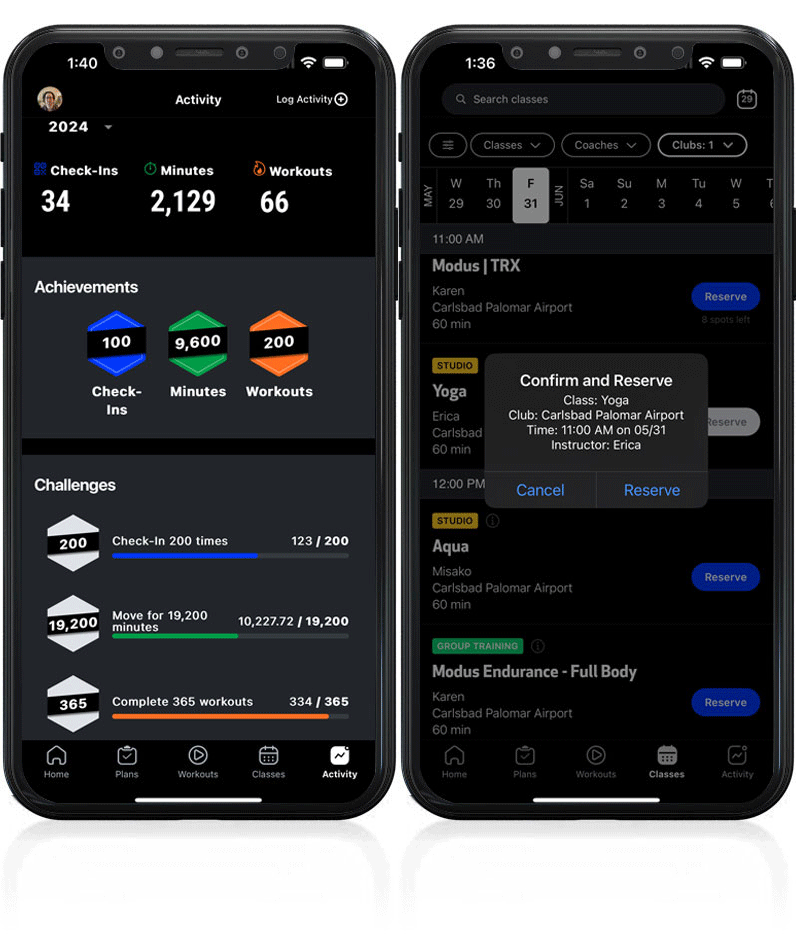
Image Source: www.24hourfitness.com
Getting Started: Your First Visit & New Member Onboarding
So, you’ve joined the 24 Hour Fitness family or are thinking about it. Congratulations! The first step to enjoying your new fitness journey is mastering the fitness club entry and 24 hour gym login. This section focuses on new member onboarding and ensuring you have all the information for a seamless start.
Signing Up and Membership Activation
Before you can even think about checking in, your membership needs to be active. The membership activation process is straightforward.
- Online Sign-Up: Most members sign up online through the 24 Hour Fitness website or app. You’ll create an account, choose your membership tier, and provide your payment information.
- In-Club Sign-Up: You can also join at any 24 Hour Fitness location. A club representative will guide you through the options and help you complete the paperwork.
- Membership Card/Digital Pass: Upon successful membership activation, you’ll typically receive a membership card or a digital pass through the 24 Hour Fitness app. This is your key to gym access. Keep it safe!
What happens after membership activation? Once your membership is active, you’re ready for your first workout! The app will usually prompt you to set up your digital pass if you chose that option.
Your First Gym Access Experience
Your initial gym access at 24 Hour Fitness is a significant step. Here’s what to expect for your very first workout entry:
- Arrival: Head to your chosen 24 Hour Fitness club during operating hours.
- Check-In Point: Locate the designated check-in area, usually near the front desk.
- Present Your Credentials:
- Membership Card: If you have a physical card, simply swipe or scan it at the check-in terminal.
- 24 Hour Fitness App: Open the app on your smartphone. Navigate to your membership details. You should find a barcode or QR code for scanning. Hold your phone up to the scanner.
- Confirmation: The system will verify your membership. You’ll likely see a confirmation message on the screen or hear a chime, indicating successful gym access.
- Enjoy Your Workout: Now you’re in! Feel free to explore the facility and begin your workout entry.
Pro Tip: Download the 24 Hour Fitness app before your first visit. This helps streamline the 24 hour gym login and member sign in process from the get-go.
Daily Member Sign-In: Your Routine Workout Entry
Once your membership is active, the daily member sign in becomes second nature. Here’s how to make your workout entry quick and easy every time.
Methods for Checking In
24 Hour Fitness offers flexible ways to ensure you can easily access the club.
1. Using Your Membership Card (Physical Card)
This is a classic and reliable method.
- Locate the Terminal: Find the self-service kiosk or scanner at the entrance.
- Swipe/Scan: Insert your membership card into the card reader or swipe it through the magnetic strip slot. If there’s a barcode, align it with the scanner.
- Verification: The terminal will read your card and confirm your active membership.
- Proceed: A green light or audible confirmation will signal you’re good to go.
Table: Membership Card Check-In Process
| Step | Action | Details |
|---|---|---|
| 1 | Approach Check-In Area | Find the designated scanning station. |
| 2 | Retrieve Membership Card | Have your physical membership card ready. |
| 3 | Swipe or Scan Card | Insert card into reader or align barcode with scanner. |
| 4 | Await Confirmation | Look for a green light, a positive audio cue, or a confirmation screen. |
| 5 | Enter the Club | Proceed through the entry gate or past the check-in desk. |
2. Using the 24 Hour Fitness Mobile App (Digital Pass)
The app is the most convenient and modern way to manage your membership and check in.
- Open the App: Launch the 24 Hour Fitness app on your smartphone.
- Navigate to Your Pass: Find the “My Pass,” “Barcode,” or “Digital Card” section. This is usually prominent on the home screen or in your profile.
- Present for Scanning: When you arrive, open this section of the app. You’ll see a barcode or QR code. Hold your phone’s screen up to the scanner at the check-in terminal.
- Confirmation: Similar to the physical card, the scanner will confirm your gym access.
Why use the app for checking in?
* Convenience: No need to carry an extra card. Your phone is usually always with you.
* No Lost Cards: You won’t have to worry about losing or forgetting your membership card.
* Additional Features: The app often provides workout tracking, class schedules, and club information.
What if my phone battery is dead? This is a common concern. If your phone is dead, you’ll likely need to visit the front desk to have your membership manually looked up. This is where having a physical card or knowing your member ID can be helpful.
3. Manual Check-In at the Front Desk
While self-service is encouraged, there are times you might need assistance.
- When to Use: This is for situations like a malfunctioning scanner, a dead phone battery, or if you’re a new member still awaiting your physical card or app setup.
- What to Provide: Be ready to provide your name and possibly your date of birth or membership ID to the front desk staff. They can then look up your account and manually grant you facility access.
Important Note on Manual Check-Ins: While helpful, frequent manual check-ins can slow down the process for everyone, including staff. It’s always best to have your card or app ready.
Guest Pass Check-In: Sharing the Fitness Journey
Want to bring a friend? 24 Hour Fitness often allows members to bring guests, but there are rules and a specific guest pass check-in procedure.
How Guest Passes Work
- Member Responsibility: Typically, the member must be present with the guest to check them in. You usually cannot send a guest alone.
- Guest Pass Limitations: Guest passes might be limited in quantity per month or have specific terms (e.g., valid for one visit). Check your membership agreement for details.
- New Member Onboarding Guest Policy: When you’re in the new member onboarding phase, check if your specific membership includes guest privileges.
The Guest Check-In Process
- Guest Arrives with Member: Both you (the member) and your guest should arrive at the club together.
- Approach Check-In: Proceed to the front desk or the designated check-in area.
- Member Identifies Themselves: You will first check yourself in using your membership card or app.
- Introduce Your Guest: Inform the front desk staff that you have a guest.
- Guest Provides Information: Your guest will likely need to provide their name, contact information, and potentially show a photo ID. They may also need to sign a waiver, especially for their first visit.
- Guest Pass Applied: The front desk staff will apply the guest pass to your account or issue a temporary guest pass.
- Guest Receives Access: Your guest will then receive their temporary gym access.
Table: Guest Pass Check-In Steps
| Step | Action | Details |
|---|---|---|
| 1 | Arrive Together | Member and guest arrive at the club at the same time. |
| 2 | Member Checks In | Member uses their card or app for their own member sign in. |
| 3 | Inform Staff About Guest | Let the front desk know you have a guest with you. |
| 4 | Guest Provides Details | Guest gives name, contact info, and shows ID if required. Signs waiver if needed. |
| 5 | Guest Pass is Processed | Staff validates and applies the guest pass. |
| 6 | Guest Gains Facility Access | Guest receives temporary access to the club. |
Can my guest use the club alone after I leave? Generally, no. Most guest passes require the member to be present for the duration of the guest’s visit. Always confirm the specific policy with the club staff.
Troubleshooting Common Check-In Issues
Even with the best systems, occasional glitches can happen. Here’s how to handle common problems to ensure continued gym access.
Issue: Scanner Not Reading Card/App
- Check Card: Is your membership card dirty or damaged? Try wiping it clean. If it’s visibly damaged, you might need a replacement.
- Check App: Is your phone screen clean? Is the barcode/QR code clear? Try restarting the app. Ensure the app is updated.
- Manual Intervention: If it persists, head to the front desk. They can assist with a manual lookup.
Issue: Membership App Not Loading
- Check Internet Connection: Your phone needs a stable internet connection (Wi-Fi or cellular data) for the app to function correctly.
- Update the App: Make sure you have the latest version of the 24 Hour Fitness app installed.
- Restart Your Phone: A simple restart can often resolve temporary app issues.
- Contact Support: If the app consistently fails, reach out to 24 Hour Fitness customer support or the club directly.
Issue: Incorrect Membership Status Showing
- Payment Issues: Has your payment failed recently? Check your billing information in the app or online account.
- Membership Type Change: Did you recently change your membership plan? There might be a slight delay in system updates.
- Talk to Staff: The front desk can clarify your membership status and resolve any discrepancies.
Issue: Facility Access Denied Unexpectedly
- Expired Membership: Ensure your membership hasn’t expired or isn’t in a grace period.
- Account Holds: Are there any outstanding dues or issues on your account that might be preventing facility access?
- Club-Specific Rules: Some clubs might have temporary access restrictions for specific areas or during peak times, though this is rare for general entry. Again, the front desk is your best resource.
Key Information for Smooth Access
To make your checking in process as smooth as possible, keep these points in mind.
What You Need for Gym Access
- Active Membership: Your membership must be current and in good standing.
- Your Membership Identifier: This is either your physical membership card or the digital pass in the 24 Hour Fitness app.
- Photo ID (Sometimes): While not always required for every check-in, it’s good practice to carry a photo ID. The club may ask for it if there are any issues with your membership card or app, or for identity verification during new member onboarding.
- Guest Pass (If Applicable): If bringing a guest, ensure you understand the guest pass policy and have your guest with you.
Best Practices for Checking In
- Download the App: This is the easiest way to manage your 24 hour gym login.
- Keep Your App Updated: Ensure you’re using the latest version for optimal performance.
- Charge Your Phone: Make sure your phone is charged if you rely on the app for entry.
- Know Your Membership Details: Be familiar with your membership type and any included benefits like guest passes.
- Be Patient: Especially during peak hours, there might be a small queue. Be courteous to staff and other members.
Frequently Asked Questions (FAQ)
Q1: Can I check into 24 Hour Fitness without my membership card or phone?
A1: Yes, you can typically check in manually at the front desk by providing your name and potentially other identifying information. However, it’s always best to have your card or app ready to speed up the process and avoid potential delays.
Q2: How do I check in if I forgot my membership card?
A2: If you forget your physical card, use the 24 Hour Fitness app for a digital check-in. If you also forgot your phone or the app isn’t working, go to the front desk, and they can assist you with a manual lookup.
Q3: What is the process for a new member’s first check-in?
A3: For your first visit after membership activation, you’ll check in using your membership card or the app. You might be asked to confirm some details or sign a waiver as part of the new member onboarding. Be prepared for a slightly more involved process than a regular daily check-in.
Q4: Can I give my 24 Hour Fitness membership to someone else?
A4: No, your 24 Hour Fitness membership is personal and cannot be shared. Attempting to use someone else’s membership or allowing someone else to use yours is a violation of the membership agreement and can result in penalties.
Q5: What are the typical hours for 24 Hour Fitness clubs?
A5: As the name suggests, many 24 Hour Fitness clubs are open 24 hours a day, 7 days a week. However, hours can vary by location, and some clubs may have reduced hours on holidays or specific days. Always check the hours for your specific club on the 24 Hour Fitness website or app.
Q6: Is there a way to track my workout entry for fitness goals?
A6: Yes, the 24 Hour Fitness app often includes features to track your check-ins and workouts, helping you monitor your progress towards your fitness goals.
Q7: What if the check-in scanner is broken?
A7: If a scanner is not working, please proceed to the front desk. Staff can manually check you in and will also be aware of the technical issue.
Q8: Do I need to check in every time I visit?
A8: Yes, for security and tracking purposes, you are required to check in for every visit to the club. This ensures accurate gym access records and helps manage club capacity.
Mastering the checking in process at 24 Hour Fitness is key to a consistent and enjoyable fitness routine. Whether you’re a seasoned member or going through new member onboarding, knowing how to facilitate your gym access ensures you spend less time at the door and more time achieving your fitness goals. Remember to keep your membership details handy, utilize the app for seamless 24 hour gym login, and always approach the front desk if you encounter any issues. Happy sweating!