
You can usually exercise with a Holter monitor safely. This small device checks your heart’s rhythm. It records your heart’s power for a day or two. Sometimes it records for longer. Doctors use it to find out if your heart works well. While wearing it, you can often do many normal daily activities. This includes light exercise like walking. But some rules are important. You must keep the monitor dry. You also need to avoid heavy sports. Your doctor will give you the best advice for your case. Always talk to your doctor before you start or change any exercise while wearing the monitor.
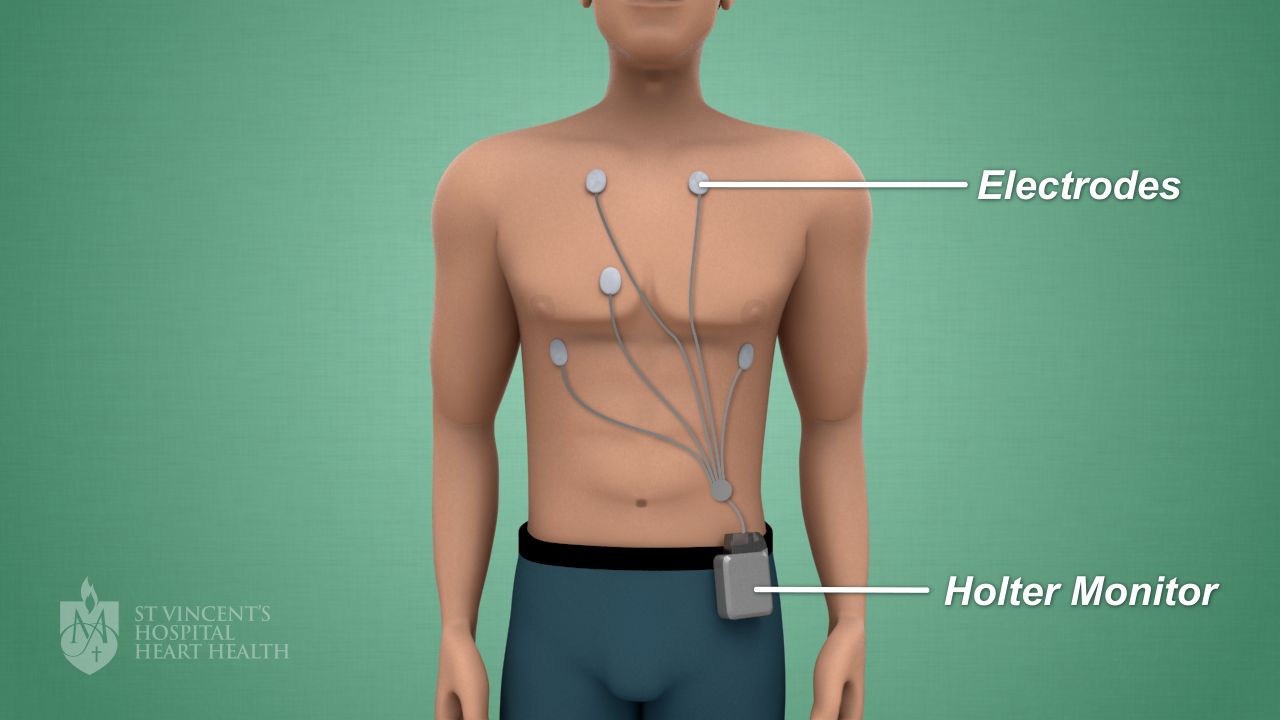
Image Source: www.svhhearthealth.com.au
Grasping the Holter Monitor
A Holter monitor is a small box. You wear it. It checks your heart’s rhythm. It records your heartbeats. It does this all day and night. It helps doctors find heart problems. It shows how your heart works during your normal day. It can show fast or slow beats. It can show skipped beats. It helps your doctor give you the best care.
What a Holter Monitor Does
The monitor is about the size of a deck of cards. It has wires. These wires connect to small patches. The patches stick to your chest. These patches are called electrodes. The electrodes pick up your heart’s electrical signals. They send these signals to the monitor. The monitor saves all this data. Your doctor then looks at this data. This helps them see what your heart does. It works even when you do not feel symptoms. It can catch heart problems that happen rarely.
Why Doctors Use This Monitor
Doctors use a Holter monitor for many reasons. They use it if you feel strange heartbeats. You might feel your heart flutter. You might feel it race. Or you might feel it skip a beat. These feelings are called palpitations. The monitor helps doctors find out why these happen.
It also helps with other issues. If you feel dizzy, it can help. If you faint, it can help. If you have chest pain, it can help. The monitor records your heart during these times. This gives your doctor a full picture. It shows if your heart rhythm is the cause. It is a key tool for heart health. It gives doctors much more information than a quick EKG in the office. An EKG only records for a few seconds. A Holter monitor records for much longer.
Navigating Exercise with Your Monitor: Key Guidelines
Exercising with a Holter monitor is often fine. But you need to follow certain rules. These rules help make sure the monitor works well. They also keep you safe. Your doctor’s advice is always most important.
Essential Holter Monitor Exercise Guidelines
Here are some general rules for physical activity with holter:
- Talk to Your Doctor First: This is the most important step. Your doctor knows your heart health best. They will tell you what exercises are safe. They might want you to do certain activities. They might want you to avoid others. Always ask before you start.
- Listen to Your Body: Pay close attention to how you feel. If you feel dizzy, stop. If you have chest pain, stop. If your heart races too much, stop. Tell your doctor about any symptoms you feel.
- Keep the Monitor Dry: Water can damage the monitor. It can also make the electrodes fall off. This means the monitor cannot record properly. We will talk more about showering soon.
- Avoid Impact Sports: Sports with lots of jumping or hard hits are not good. This includes sports like basketball or football. High impact can dislodge electrodes. It can also damage the monitor.
- Record Symptoms: Keep a diary. Write down when you exercise. Write down how you feel. Note any heart symptoms. This helps your doctor link your activity to your heart’s rhythm.
- Gentle Movement: Light to moderate activity is usually fine. Think about a slow walk. Or do light chores around the house.
Can You Walk with Holter Monitor?
Yes, you can usually walk with a Holter monitor. Walking is often a good activity. It is low impact. It does not cause a lot of sweat quickly. Many doctors even want you to walk. They want to see how your heart works during normal daily actions. This helps them get the best information. You can walk around your house. You can walk in your neighborhood. Just make sure the monitor stays secure. Keep the wires in place. Do not let them pull or snag.
Running with Holter Monitor
Running with a Holter monitor is trickier. It depends on your doctor’s orders. It also depends on the monitor type. Some monitors are more robust. Some are less so. Running causes more movement. It also causes more sweat. Both can make electrodes loosen. They can also affect the monitor. If your doctor says running is okay, start slow. Run for a short time. Watch how you feel. Check the monitor and wires often. If you run, you might need to tape the electrodes down extra. But most times, doctors advise against heavy running. They want clear data. Lots of movement can make the data less clear.
Holter Monitor Sports
Most sports are not advised when wearing a Holter monitor. Here’s why:
- Contact Sports: Avoid sports like football, rugby, or wrestling. These sports involve hitting. A hit can damage the monitor. It can also pull off the electrodes.
- Water Sports: Do not swim. Do not surf. Do not do any water activity. The monitor must stay dry.
- High-Impact Sports: Jumping sports like basketball or volleyball can be risky. The bouncing can loosen electrodes.
- Heavy Lifting: Lifting very heavy weights can strain your heart. It can also cause a lot of sweat. Both can affect the monitor. It’s usually best to avoid heavy weightlifting.
If your doctor wants to see your heart during a specific sport, they might make an exception. But this is rare. Always follow their special instructions.
Working Out with Heart Monitor
When you are working out with heart monitor, think light to moderate.
- Gym Workouts: If your doctor says it is okay, you can do some gym activities. Use exercise bikes or ellipticals at a low pace. Avoid treadmills if running is not advised. Avoid machines that make you sweat a lot.
- Yoga or Pilates: Gentle forms of yoga or Pilates might be okay. Avoid moves that put pressure on the chest. Avoid moves that might dislodge the monitor. Ask your doctor about these activities.
- Everyday Chores: Doing chores like light cleaning or gardening is good. These are normal daily activities. They help the doctor see your heart in a normal setting.
Remember, the main goal is to get good data. If your exercise makes the data unclear, it is not helping.
Handling Daily Activities with Your Monitor
Life goes on when you wear a Holter monitor. You need to adjust some daily activities holter monitor to keep the device safe.
Showering with Holter Monitor
This is a common question. Most Holter monitors cannot get wet. This means you cannot shower or bathe normally. Your doctor will tell you what to do. Often, you will need to:
- Detach the Monitor: You might be able to unclip the monitor from the electrodes. Then you can shower quickly. Do not get the electrodes wet. They are stuck to your skin. After showering, dry off well. Then reattach the monitor. Your doctor will show you how to do this.
- Sponge Bath: If you cannot detach it, you will need to take a sponge bath. Use a wet washcloth to clean yourself. Be careful not to get the monitor or electrodes wet.
- Special Covers: Some monitors come with special waterproof covers. But these are not common. Always check with your doctor first.
Never try to shower or bathe if your doctor says no. Water can break the device. This stops the test.
Sweat Holter Monitor
Sweat is a problem for Holter monitors. It can make the electrodes loose. Loose electrodes mean bad data. Or no data at all. If you sweat a lot, the electrodes might fall off.
Here’s how to manage sweat:
- Avoid Strenuous Exercise: Heavy workouts make you sweat. Avoid these.
- Stay Cool: Try to stay in cool places. Avoid hot weather or hot rooms.
- Loose Clothes: Wear loose, cotton clothes. These help your skin breathe. This can reduce sweat.
- Gentle Drying: If you do sweat, gently pat the skin around the electrodes dry. Do not rub hard. Do not try to remove electrodes.
- Secure Electrodes: If electrodes seem loose from sweat, you might need extra medical tape. Ask your doctor or the clinic if this is okay. They might give you special tape.
Holter Monitor Restrictions
Beyond exercise and water, there are other holter monitor restrictions:
- Magnetic Fields: Stay away from strong magnets. This includes MRI machines. It can also include metal detectors. Tell airport security you have a medical device. They might do a pat-down instead.
- Electrical Blankets: Avoid electric blankets or heating pads. They can cause electrical interference. This can mess up the heart readings.
- High-Voltage Areas: Stay clear of large electrical equipment. This includes power lines or big generators.
- Sleeping: Sleep on your back if possible. Or sleep on your side away from the monitor. This helps keep the electrodes from pulling. It also protects the device.
- Clothing: Wear loose clothes. Do not wear tight shirts. They can pull on the wires or rub the electrodes off.
Common Concerns and Troubleshooting
Sometimes things go wrong with the monitor. Knowing what to do can help.
What if an Electrode Comes Loose?
This can happen, especially with movement or sweat. If an electrode feels loose:
- Gently Press it Back: If it’s just lifting at the edge, gently press it down. Do not press too hard.
- Use Extra Tape (If Advised): Your clinic might give you special medical tape. You can use it to secure the edges. Do not use regular tape. Regular tape can irritate your skin.
- Call Your Clinic: If an electrode comes fully off, call your doctor’s office. They might tell you to put a new one on. Or they might ask you to come in. They might tell you the test needs to restart. This is why keeping extra electrodes on hand is a good idea. Your clinic might provide them.
What if the Monitor Gets Wet?
If the monitor gets wet, call your doctor’s office right away. Water can damage the device. It might stop working. They will tell you what to do next. You might need a new monitor.
What if the Monitor Beeps or Acts Strangely?
A beeping monitor means something is wrong. It might mean an electrode is loose. It might mean the battery is low. Or it could be a warning. Check the wires. Check the electrodes. If it keeps beeping, call your clinic. Do not try to fix the monitor yourself.
Keeping a Good Diary
A diary is a key part of your Holter test. It is also called an activity log. You write down what you do. You also write down how you feel. This helps your doctor. They can match your symptoms to your heart’s rhythm.
Write down:
- Date and Time: When did something happen?
- Activity: What were you doing? Were you walking? Sitting? Eating? Sleeping? Exercising?
- Symptoms: How did you feel? Did your heart race? Did you feel dizzy? Did you have chest pain?
- Duration: How long did the symptom last?
The more details you give, the better. This helps your doctor get the clearest picture of your heart’s health.
Fathoming the Importance of Your Activity Log
The activity log is super important. It is not just about what you did. It’s about connecting your life to your heart’s signals. The monitor gathers data. Your log gives that data meaning.
Imagine your heart made a strange beat at 2:00 PM. If your log says you were running fast at 2:00 PM, that explains it. If your log says you were sitting quietly, that’s different. It tells the doctor more about the strange beat.
This log helps your doctor:
- Find Triggers: It shows what activities might cause symptoms.
- See Patterns: It helps them see if symptoms happen at certain times or with certain actions.
- Make Diagnoses: It helps them understand your heart’s behavior better. This leads to the right diagnosis.
- Plan Treatment: With a clear diagnosis, your doctor can choose the best treatment for you.
So, write everything down. Even small things. It all helps.
Physical Activity with Holter: A Deeper Look
Doctors often want you to be active. They want to see how your heart handles normal stress. This is why physical activity with holter is often encouraged. But it needs to be the right kind of activity.
Tailoring Physical Activity to Your Health
The best type of exercise while wearing a Holter monitor depends on your health. It depends on why you need the monitor.
- If you get dizzy when active: Your doctor might want you to do light activity. This helps them see if the dizziness is from your heart.
- If you get chest pain when walking: Your doctor might want you to walk. They want to record your heart during that pain.
- If you are generally healthy: You might be able to do more. But always follow your doctor’s limits.
Do not push yourself. Do not try to do too much. The goal is to get data during your normal life. It is not to test your fitness limits.
When to Stop Exercising
Always stop exercising and rest if you feel:
- Chest pain
- Severe dizziness
- Feeling faint or lightheaded
- Extreme shortness of breath
- Very strong or irregular heartbeats that worry you
Record these symptoms in your diary right away. Call your doctor if symptoms are severe or do not go away.
Why Some Exercise is Good for Diagnosis
Exercise puts a little stress on your heart. This stress can bring out heart problems that do not show up at rest. The Holter monitor captures this. For example, some irregular heartbeats only happen during activity. By exercising safely, you help your doctor catch these events. This makes the diagnosis more accurate. It helps them find the exact problem.
Final Thoughts and Next Steps
Wearing a Holter monitor is a simple way to learn about your heart. It gives your doctor a lot of important information. By following the rules, you help make the test a success.
Reiterate Talking to the Doctor
We cannot stress this enough. Every person is different. Your heart health is unique. What is safe for one person might not be safe for you. Your doctor’s instructions are made just for you. Always ask them questions. If you are unsure about an activity, ask. If you feel new symptoms, tell them.
Importance of Full Compliance
Follow all instructions. Wear the monitor for the full time. Keep a detailed log. Avoid things that can mess up the monitor. This helps your doctor get the best data. This data leads to the best care for your heart. If you do not follow the rules, the test might not work. You might need to do it again.
What Happens After the Monitoring Period
When the time is up, you will return the monitor. The clinic will download the data. Your doctor will then review the recordings. They will match it with your diary. They will then tell you what they found. They will explain what it means for your heart health. This might mean starting new medicines. Or it might mean no problem was found. Either way, you get important answers.
Frequently Asked Questions (FAQ)
Here are some common questions about using a Holter monitor.
Q1: Can I sleep with the Holter monitor?
Yes, you should sleep with the Holter monitor. The test records your heart during your normal daily and nightly routines. This includes sleep. Sleeping with it helps your doctor see if any heart issues happen while you rest. Try to sleep on your back or a side where the monitor is not pressed. This helps keep the electrodes secure.
Q2: What if I have to go through a metal detector?
Tell the security person that you have a medical device. Show them your Holter monitor. Most times, they will let you skip the metal detector. They might do a pat-down instead. It is best to avoid walking through metal detectors if you can. They can cause problems with the monitor’s readings.
Q3: Can I drive a car with a Holter monitor?
Yes, you can usually drive a car. Driving is a normal daily activity. It does not usually cause problems for the monitor. Make sure the wires and device do not get in the way of your driving.
Q4: Will the Holter monitor bother me while I do daily activities holter monitor?
It might feel a little strange at first. The device is small. The wires are thin. But you might feel them. The electrodes stick to your skin. They can sometimes feel itchy. Most people get used to it quickly. Try to wear loose clothes. This helps the monitor feel more comfortable.
Q5: How long do I wear the Holter monitor?
The time you wear it depends on your doctor’s order. Most Holter monitors are worn for 24 to 48 hours. Some types of monitors can be worn for several days. Even up to two weeks. Your doctor will tell you the exact time.
Q6: Can I take a bath with the Holter monitor?
No, you cannot take a bath. You must keep the Holter monitor and the electrodes completely dry. Water can damage the device. It can also make the electrodes fall off. This will stop the test. You will need to take a sponge bath or detach the monitor if your doctor tells you how.
Q7: What kind of clothes should I wear with a Holter monitor?
Wear loose-fitting clothes. A loose shirt or top is best. This helps hide the monitor. It also stops the wires from pulling. Tight clothes can pull on the wires. They can also rub against the electrodes. This can make them loose or cause skin irritation.
Q8: Can I use my cell phone or computer with the monitor on?
Yes, you can use your cell phone and computer. These devices usually do not cause problems with the Holter monitor. Keep your cell phone at a normal distance. Do not place it directly on top of the monitor.
Q9: What if my skin gets irritated from the electrodes?
Some people get skin irritation from the sticky electrodes. If your skin feels itchy or red, try not to scratch it. Call your doctor’s office. They might suggest a special cream. Or they might tell you to remove the electrodes and come in. Do not remove them without talking to your doctor first.
Q10: Is there anything else I should avoid?
Yes. Avoid electric toothbrushes while the monitor is working. Avoid electric shavers. Avoid strong magnets like MRI machines. Stay away from high-voltage areas. Do not use electric blankets. Always ask your doctor about specific tools or areas you are unsure about.