
Can you log food with MyFitnessPal? Yes, MyFitnessPal is primarily designed for logging your food intake and tracking your calorie consumption, making it an invaluable tool for managing your diet and achieving your fitness goals. This comprehensive guide will walk you through how to effectively use MyFitnessPal to master your diet and calorie counting.
MyFitnessPal is a powerful app that helps you track what you eat and how much you move. It’s like having a personal nutritionist and trainer in your pocket! Whether you want to lose weight, gain muscle, or simply eat healthier, MyFitnessPal can be your best friend.
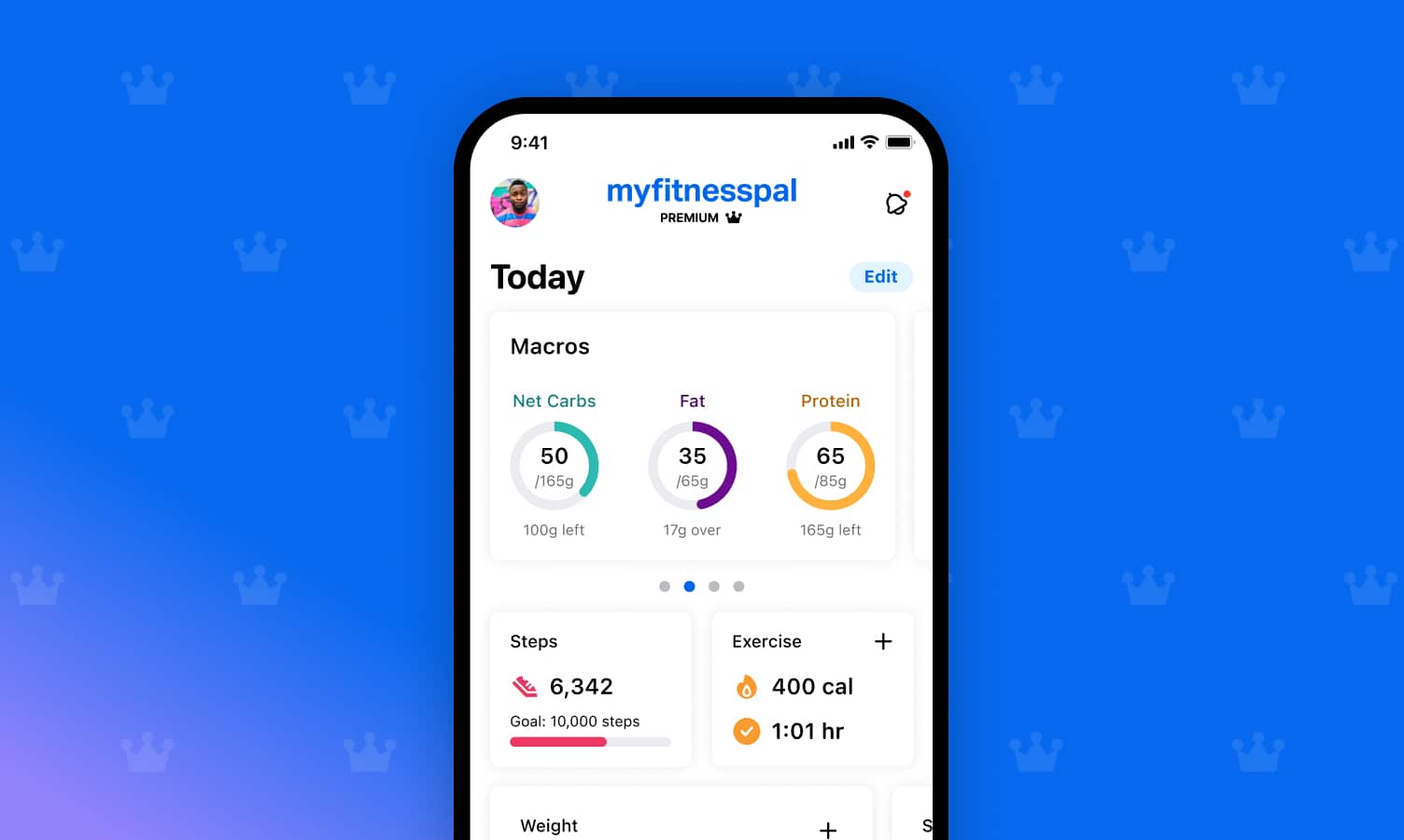
Image Source: blog.myfitnesspal.com
Getting Started with MyFitnessPal
First things first, you need to download the app. It’s available on both iOS and Android devices. Once installed, create your account. You’ll be asked for some basic information to set up your profile.
Setting Up Your Profile
- Personal Details: You’ll enter your age, gender, height, and current weight. This helps the app calculate your Basal Metabolic Rate (BMR), which is the number of calories your body burns at rest.
- Activity Level: Be honest about your daily activity. Are you mostly sedentary? Do you have an active job? Do you exercise regularly? This information is crucial for determining your Total Daily Energy Expenditure (TDEE).
- Goals: This is where you tell MyFitnessPal what you want to achieve. Do you want to lose weight, maintain your weight, or gain weight? You can set a specific weight goal and a weekly rate of change. MyFitnessPal will then calculate your daily calorie goal based on this information.
Your Daily Calorie Goal
Your calorie goal is the total number of calories you should consume each day to reach your desired outcome. MyFitnessPal uses your BMR and TDEE, along with your goals, to set this number.
- Weight Loss: To lose weight, you need to create a calorie deficit, meaning you burn more calories than you consume. MyFitnessPal will suggest a deficit that aims for a safe and sustainable weight loss, typically 1-2 pounds per week.
- Weight Gain: To gain weight, you need a calorie surplus. MyFitnessPal will help you set a calorie target to support muscle growth or weight gain.
- Weight Maintenance: If your goal is to maintain your current weight, MyFitnessPal will set a calorie goal that matches your TDEE.
Mastering Your MyFitnessPal Log
The core of using MyFitnessPal is the MyFitnessPal log. This is where you meticulously record everything you eat and drink. Accuracy is key here!
Adding Foods to Your Diary
- Search Function: MyFitnessPal has a massive database of foods. Simply type the name of the food you ate into the search bar.
- Portion Sizes: This is vital. Be precise with your portion sizes. Use measuring cups, spoons, or a food scale for the most accurate tracking. MyFitnessPal allows you to log in grams, ounces, cups, and common household measurements.
- Meal Categories: Foods are categorized by meal (Breakfast, Lunch, Dinner, Snacks). Make sure to log items in the correct meal.
The MyFitnessPal Barcode Scanner
This is a lifesaver for packaged foods!
- How it Works: Open the app, go to your food diary, and tap “Add Food.” You’ll see an option to scan a barcode. Hold your phone’s camera over the barcode on the food packaging, and MyFitnessPal will instantly pull up the nutritional information.
- Benefits: This saves tons of time and reduces errors. It’s perfect for things like cereal boxes, canned goods, frozen meals, and protein bars.
Adding Meals and Recipes
- Creating Meals: If you eat the same combination of foods frequently, you can save them as a “Meal.” This makes logging much faster. For example, if you always have oatmeal with berries and nuts for breakfast, save it as “My Breakfast.”
- MyFitnessPal Recipe Builder: This is a fantastic feature for homemade meals.
- How to Use: Go to the “More” tab and select “Recipes & Meals.” Then, choose “Create a Recipe.”
- Input Ingredients: Enter each ingredient and its quantity, just as you would when logging individual foods.
- Serving Size: Specify how many servings the recipe makes.
- Nutrition Calculation: MyFitnessPal will automatically calculate the nutritional breakdown per serving.
- Benefits: This allows you to accurately track the calories and nutrients in your home-cooked dishes, which can be tricky otherwise.
Logging Drinks
Don’t forget to log your beverages! Water is generally calorie-free, but sodas, juices, milk, and alcoholic drinks can add significant calories. Be sure to log them accurately.
The MyFitnessPal Calorie Counter in Action
The MyFitnessPal calorie counter is the central hub of your tracking.
Viewing Your Daily Summary
As you log your food, the app updates your daily calorie total in real-time. You’ll see:
- Calories Remaining: The difference between your daily calorie goal and the calories you’ve consumed so far.
- Calories Burned: This includes calories burned through your BMR and any logged exercise.
- Net Calories: Calories consumed minus calories burned from exercise.
Macronutrient Tracking
MyFitnessPal doesn’t just track calories; it also tracks MyFitnessPal macronutrients: protein, carbohydrates, and fats.
- Importance: Macronutrients are essential for body composition, energy levels, and overall health.
- Protein: Crucial for muscle repair and growth, and helps with satiety.
- Carbohydrates: Your body’s primary energy source.
- Fats: Important for hormone production and nutrient absorption.
- Setting Macros: In the “Goals” section, you can adjust your macronutrient goals as percentages of your total calorie intake. For example, if your goal is to build muscle, you might aim for a higher protein intake.
- Monitoring Your Macros: The app provides a breakdown of your daily macro intake, showing how close you are to your targets. This helps you ensure you’re getting a balanced intake.
MyFitnessPal Exercise Logging
To get a complete picture of your energy balance, you need to track your physical activity. MyFitnessPal exercise logging is straightforward.
Adding Exercises
- Cardio: Search for activities like running, cycling, swimming, or even dancing. MyFitnessPal provides estimated calorie burns for various durations and intensities.
- Strength Training: You can log weightlifting sessions, specifying the exercises, sets, reps, and weight lifted. MyFitnessPal will estimate the calories burned.
- Manual Entry: If your specific activity isn’t listed, you can manually enter it with an estimated duration and intensity.
Syncing with Fitness Devices and Apps
This is where MyFitnessPal truly shines. It can connect with a vast array of fitness trackers and apps.
- How it Works: Go to “More” > “Apps & Devices” and connect your preferred device or app (e.g., Fitbit, Apple Health, Garmin, Strava).
- Benefits: Once synced, your workouts and calorie burn data will automatically transfer to MyFitnessPal, saving you the trouble of manual entry and ensuring accuracy. This provides a more holistic view of your calorie expenditure.
Utilizing MyFitnessPal for Specific Goals
MyFitnessPal is versatile and can be adapted to various fitness objectives.
Weight Loss Strategies
- Consistency is Key: Log every bite and sip.
- Calorie Deficit: Stick to your calorie goal.
- Protein Intake: Ensure you’re getting enough protein to feel full and preserve muscle.
- Hydration: Drink plenty of water.
Muscle Gain Strategies
- Calorie Surplus: You’ll need to eat more calories than you burn.
- High Protein: Prioritize protein intake to support muscle repair and growth.
- Strength Training: Combine diet with a consistent strength training program.
Healthy Eating Habits
- Focus on Whole Foods: Log fruits, vegetables, lean proteins, and whole grains.
- Limit Processed Foods: These often have hidden sugars and unhealthy fats.
- Mindful Eating: Pay attention to portion sizes and how different foods make you feel.
MyFitnessPal Premium Features
While the free version of MyFitnessPal is excellent, MyFitnessPal Premium features offer enhanced capabilities for those who want to dive deeper.
What Premium Offers
- Nutrient Tracking: Beyond macros, Premium allows you to track micronutrients like vitamins and minerals. This is great for ensuring you’re not deficient in any essential nutrients.
- Meal Plans & Recipes: Access to curated meal plans and healthy recipes tailored to your goals.
- Advanced Reporting: Get more detailed insights into your eating patterns, nutrient intake over time, and progress.
- Customizable Goals: More flexibility in setting specific nutrient goals.
- Ad-Free Experience: Enjoy the app without advertisements.
Is Premium Worth It?
For casual users, the free version is usually sufficient. However, if you are serious about optimizing your nutrition, have specific dietary needs (e.g., sports nutrition, managing a medical condition), or want more detailed analysis, MyFitnessPal premium features can be a valuable investment.
Tips for Success with MyFitnessPal
- Be Honest: Don’t fudge numbers or skip logging. Accuracy is paramount.
- Weigh Your Food: Especially initially, use a food scale to get accurate portion sizes.
- Log Before You Eat: This helps you make better choices and stay within your calorie goals.
- Don’t Aim for Perfection, Aim for Progress: Some days will be better than others. If you overeat, just get back on track the next meal or day.
- Explore the Database: Get familiar with the food entries and learn how to choose the most accurate ones. Look for entries with a green checkmark, indicating they are verified.
- Use the “MyFitnessPal Recipe Builder” Regularly: This is key for accurate tracking of homemade meals.
- Regularly Check Your “MyFitnessPal Macronutrients” Breakdown: Ensure your fat, carb, and protein ratios align with your goals.
Common Pitfalls to Avoid
- Underestimating Portion Sizes: This is the most common mistake.
- Forgetting to Log Drinks: Especially caloric beverages.
- Inaccurate Exercise Logging: Overestimating calories burned from exercise can lead to overeating.
- Ignoring Micronutrients: While calories and macros are important, don’t neglect vitamins and minerals.
- Getting Discouraged: Plateaus and slip-ups happen. Don’t let them derail your progress.
Frequently Asked Questions (FAQ)
Q1: What is MyFitnessPal used for?
A1: MyFitnessPal is primarily used for tracking food intake, counting calories, monitoring macronutrients, and logging exercise to help users achieve their weight management and fitness goals.
Q2: Can I sync MyFitnessPal with my Apple Watch or Fitbit?
A2: Yes, MyFitnessPal allows MyFitnessPal syncing with a wide range of fitness devices and apps, including Apple Watch and Fitbit, to automatically import your exercise data.
Q3: How accurate is the MyFitnessPal barcode scanner?
A3: The MyFitnessPal barcode scanner is generally very accurate, pulling data from a vast database. However, it’s always a good idea to double-check the nutritional information against the product packaging, as entries can sometimes be user-submitted and occasionally incorrect.
Q4: How do I track homemade meals in MyFitnessPal?
A4: You can use the MyFitnessPal recipe builder to input all the ingredients and serving sizes of your homemade meal, and MyFitnessPal will calculate the nutritional information per serving.
Q5: What are MyFitnessPal macronutrients?
A5: MyFitnessPal macronutrients refer to the breakdown of protein, carbohydrates, and fats in your diet, which the app helps you track to ensure a balanced intake according to your goals.
Q6: Is MyFitnessPal Premium necessary to lose weight?
A6: No, the free version of MyFitnessPal is very effective for weight loss. MyFitnessPal premium features offer additional benefits like detailed nutrient tracking and meal plans, which can be helpful but are not essential for basic weight loss tracking.
Q7: How do I log my water intake in MyFitnessPal?
A7: You can usually find a dedicated section to log your water intake on your daily food diary screen. Tap to add glasses or bottles of water.
Q8: What if a food I eat isn’t in the MyFitnessPal database?
A8: If a food isn’t listed, you can manually add it. You’ll need to find the nutritional information from the packaging or a reliable source and input it yourself. You can also use the “Create a Recipe” feature if it’s a combination of ingredients.
By mastering the tools and features within MyFitnessPal, you gain significant control over your dietary habits. The ability to meticulously MyFitnessPal log your intake, leverage the MyFitnessPal calorie counter, utilize the convenient MyFitnessPal barcode scanner, and track your MyFitnessPal macronutrients empowers you to make informed decisions. Incorporating MyFitnessPal exercise logging and exploring features like the MyFitnessPal recipe builder and MyFitnessPal syncing further enhances your journey. While the free version is robust, considering MyFitnessPal premium features can offer advanced insights for those seeking a deeper level of nutritional mastery. Stick with it, be consistent, and you’ll be well on your way to achieving your health and fitness MyFitnessPal goals.