
Your Guide: How To Check Your 24 Hour Fitness Membership Easily
Want to know how to check your 24 Hour Fitness membership details? You can easily check your 24 Hour Fitness membership status, view your billing history, and find information about your contract by logging into your 24 Hour Fitness account online or through their mobile app. This guide will walk you through all the steps.
Joining a gym is a great step towards a healthier lifestyle. 24 Hour Fitness offers a wide range of facilities and classes, providing ample opportunities to reach your fitness goals. However, like any service, it’s important to stay informed about your membership details. Whether you need to verify your current plan, check your billing cycle, or understand your contract terms, knowing how to access this information is key to managing your 24 Hour Fitness account effectively. This guide will provide a comprehensive walkthrough on how to check your 24 Hour Fitness membership easily, ensuring you have all the information you need at your fingertips.
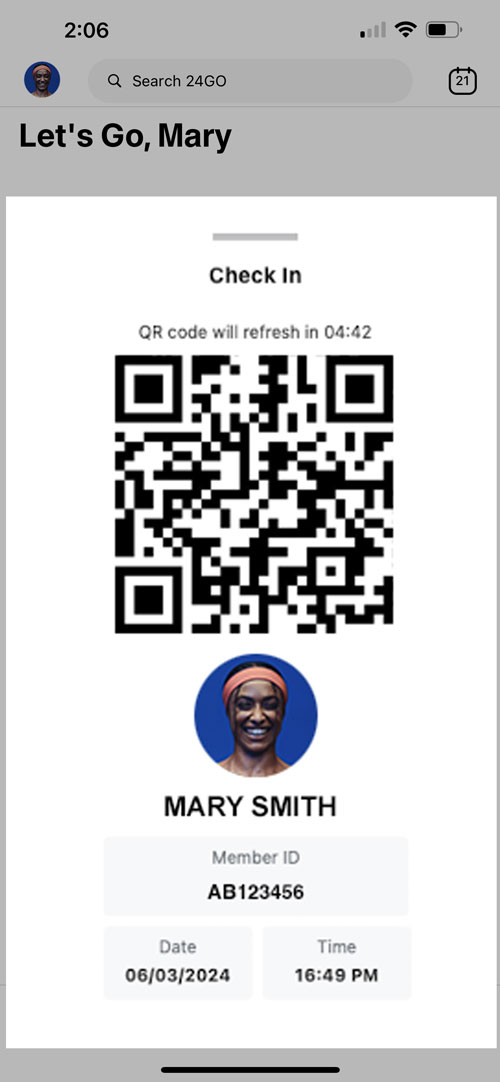
Image Source: www.24hourfitness.com
Navigating Your 24 Hour Fitness Account
The primary way to check your 24 Hour Fitness membership is by accessing your online account. This portal is designed to give you control over your membership, allowing you to view important details and manage your subscription.
Logging In to Your 24 Hour Fitness Account
To begin, you’ll need to locate the 24 Hour Fitness website.
- Visit the Official Website: Go to the official 24 Hour Fitness website. You can usually find this by searching “24 Hour Fitness” in your preferred search engine.
- Find the Login Section: Look for a “Login” or “Sign In” button, typically found in the upper right-hand corner of the homepage.
- Enter Your Credentials: You’ll be prompted to enter your username or email address and your password. Make sure to use the same information you provided when you initially signed up for your membership.
- Access Your Dashboard: Once logged in, you’ll be directed to your personalized dashboard. This is where you can find most of your membership information.
If you’ve forgotten your password, there will usually be a “Forgot Password?” link. Click this and follow the on-screen instructions to reset it.
The 24 Hour Fitness Mobile App
For even more convenience, 24 Hour Fitness offers a mobile app. Downloading and using the app is another excellent way to manage your 24 Hour Fitness membership and check your status on the go.
- Download the App: Search for “24 Hour Fitness” in your device’s app store (Apple App Store or Google Play Store). Download and install the official app.
- Log In: Open the app and log in using your existing 24 Hour Fitness account credentials. If you don’t have an account yet, you can usually create one through the app.
- Explore Features: The app provides access to class schedules, gym hours, and importantly, your membership details. Navigate through the app’s menu to find sections related to your account.
The app is a fantastic tool for checking your 24 Hour Fitness status anytime, anywhere.
What Information Can You Find?
Once you’re logged into your 24 Hour Fitness account, you can access a wealth of information about your membership. This includes details about your current plan, billing, and any specific terms associated with your contract.
Checking Your Membership Status
Your membership status is crucial. It confirms that your membership is active and that you have access to the club’s facilities.
- Active Membership: This indicates your membership is current and you are in good standing.
- Payment Due: If there’s a payment outstanding, this will be clearly displayed, along with the amount and due date.
- Membership Type: You can see the specific type of membership you have (e.g., month-to-month, annual plan, specific club access).
Reviewing Your 24 Hour Fitness Billing
Understanding your billing is essential for managing your budget and avoiding unexpected charges. Your online account will provide a detailed history.
- Payment History: View past payments, including dates, amounts, and the method of payment used.
- Next Billing Date: This shows when your next payment is scheduled.
- Payment Methods: You can see the credit or debit card or bank account linked to your membership. You can also often update your payment information here.
- Invoices: For some plans, you may be able to access detailed invoices for your payments.
This section is vital for monitoring your 24 Hour Fitness billing.
Verifying 24 Hour Fitness Renewal Details
Knowing when your membership renews is important, especially if you have a contract that automatically renews.
- Renewal Date: The system will clearly state when your current membership term is set to expire and renew.
- Renewal Cost: You can often see the price at which your membership will renew. It’s a good idea to check this periodically, as prices can change.
This helps you plan for your 24 Hour Fitness renewal and make informed decisions.
Deeper Dive: Managing Your 24 Hour Fitness Membership
Beyond just checking details, your online account empowers you to actively manage your 24 Hour Fitness membership. This includes making changes, updating information, and even initiating certain processes like cancellation.
Updating Personal Information
Keeping your contact details up-to-date is important. If you move or change your phone number, you’ll want to update it in your 24 Hour Fitness account.
- Contact Details: Update your email address, phone number, and mailing address.
- Password: You can change your password for security purposes.
Modifying Your Membership Plan
In some cases, you might be able to change your membership plan through your online account. This could involve upgrading to a higher tier or potentially switching to a different type of membership if available.
- Plan Options: Explore if there are different membership tiers or promotions you can switch to.
- Upgrade/Downgrade: Follow the prompts to make changes to your plan, if permitted by your 24 Hour Fitness contract.
Understanding 24 Hour Fitness Terms and Your Contract
Your membership agreement is a legal document outlining the terms and conditions of your membership. Accessing and reviewing these is crucial.
- Membership Agreement: Your online account should provide access to a digital copy of your 24 Hour Fitness contract.
- Key Clauses: Pay attention to clauses regarding membership duration, renewal policies, cancellation procedures, and any fees associated with changes or termination.
- 24 Hour Fitness Terms: Familiarize yourself with the general terms of service that apply to all members.
This section is where you can truly comprehend the specifics of your commitment.
Common Tasks Related to Your Membership
There are several common reasons why members need to check their membership details. Understanding these scenarios can help you navigate your account more effectively.
Initiating 24 Hour Fitness Cancellation
If you decide to end your membership, knowing the proper procedure is essential to avoid further charges and adhere to your 24 Hour Fitness terms.
- Cancellation Policy: Your contract will outline the notice period required for cancellation and any associated fees.
- Online Cancellation: Some memberships may allow for cancellation directly through your online account. Look for a “Cancel Membership” or similar option.
- Contacting Member Services: If online cancellation isn’t an option, you’ll likely need to contact 24 Hour Fitness member services directly. This might involve calling them or visiting a club in person.
- Written Notice: Be prepared to provide written notice, often via mail or email, as specified in your 24 Hour Fitness contract. Keep a copy of any cancellation request for your records.
It’s crucial to follow the exact steps for 24 Hour Fitness cancellation to ensure a smooth process.
Pausing or Freezing Your Membership
Life happens, and sometimes you might need to temporarily pause your membership rather than cancel it entirely.
- Freeze Policy: Check your 24 Hour Fitness contract for information on whether membership freezes are allowed and under what conditions.
- Duration: Understand the maximum duration for which you can freeze your membership and any associated fees.
- Reactivation: Learn how to reactivate your membership after a freeze period.
Inquiring About 24 Hour Fitness Benefits
Part of managing your membership is also knowing what you’re entitled to. This includes understanding the 24 Hour Fitness benefits.
- Club Access: Which specific clubs can you access with your membership?
- Classes: Are group fitness classes included in your membership, and how do you book them?
- Guest Passes: Does your membership include guest passes, and how do you use them?
- Special Offers: Are there any member-exclusive discounts or offers available?
Your account portal or the 24 Hour Fitness website can provide details on the 24 Hour Fitness benefits tied to your plan.
Troubleshooting Common Issues
Sometimes, you might encounter problems when trying to access or manage your account. Here are a few common issues and how to address them.
Login Problems
- Incorrect Credentials: Double-check your username/email and password for typos.
- Caps Lock: Ensure your Caps Lock key is not accidentally enabled.
- Account Lockout: If you’ve made too many failed login attempts, your account might be temporarily locked. Try again after a short period or use the “Forgot Password” option.
- Browser Issues: Clear your browser’s cache and cookies, or try logging in using a different web browser or incognito mode.
Billing Discrepancies
If you notice an error in your 24 Hour Fitness billing, such as an incorrect charge or a duplicate payment, it’s important to address it promptly.
- Contact Customer Support: Reach out to 24 Hour Fitness member services. Have your membership number and details of the transaction in question ready.
- Provide Documentation: If possible, provide screenshots or copies of your bank statements showing the incorrect charges.
Difficulty Finding Information
If you’re struggling to find specific details about your 24 Hour Fitness status or contract:
- Use the Search Function: Most online portals have a search bar that can help you find specific topics.
- Navigate Menus: Explore all sections of your account dashboard. Information might be located under “Account Details,” “Billing,” “Membership,” or “My Profile.”
- Check FAQs: The 24 Hour Fitness website often has a Frequently Asked Questions (FAQ) section that might contain the answers you’re looking for.
Table: Ways to Check Your 24 Hour Fitness Membership
| Method | How to Access | Best For |
|---|---|---|
| Online Portal | Log in via the 24 Hour Fitness website | Comprehensive view of account, billing, contract, and personal details. |
| Mobile App | Download and log in via the 24 Hour Fitness app | Quick access to membership status, class schedules, and account updates. |
| Customer Service | Phone or in-person at a club | Resolving complex issues, specific inquiries, or initiating account changes. |
Frequently Asked Questions (FAQ)
Q1: How do I find my 24 Hour Fitness membership number?
Your membership number is usually found on your membership card, in your welcome email, or by logging into your 24 Hour Fitness account online. It’s often displayed prominently in your account dashboard.
Q2: Can I check my 24 Hour Fitness status without logging in?
Generally, you need to log in to your 24 Hour Fitness account to view specific details about your membership status, billing, and contract. Some basic information about club hours or general offerings might be available without logging in, but personal membership details require authentication.
Q3: What if I need to update my payment method for 24 Hour Fitness billing?
You can typically update your payment information by logging into your 24 Hour Fitness account online or through the mobile app. Look for a section like “Billing Information” or “Payment Methods.”
Q4: How long does 24 Hour Fitness cancellation take?
The time it takes to process a 24 Hour Fitness cancellation can vary depending on the method used and any notice period required by your contract. It’s best to follow the specific instructions provided in your membership agreement or by customer service. Always aim to complete the process well before your next billing date to avoid further charges.
Q5: What are the common 24 Hour Fitness renewal terms?
Most 24 Hour Fitness memberships automatically renew unless you provide notice of cancellation according to the terms of your 24 Hour Fitness contract. The renewal cost and date will typically be outlined in your membership agreement and accessible through your online account.
Q6: Where can I see my 24 Hour Fitness contract details?
You can usually find a digital copy of your 24 Hour Fitness contract by logging into your 24 Hour Fitness account on their website. Look for a section labeled “Membership Agreement,” “My Contract,” or similar.
By familiarizing yourself with these methods, you can easily manage and check your 24 Hour Fitness membership, ensuring you get the most out of your fitness journey. Staying informed about your 24 Hour Fitness status and terms is a key part of a positive gym experience.